
Help Center / My To-Dos
My To-Dos
Your real BQE CORE to-do list, managed without leaving what you're doing. · 3 min read
Your list, straight from CORE#
Open My Work in the sidebar and pick the To-Dos tab. My to-dos is your real BQE CORE list, not a copy: check one off here and it completes in CORE; a to-do created in CORE (or by a Resource Allocation flag) shows up here. The list is sorted by due date, so what's next is always on top.
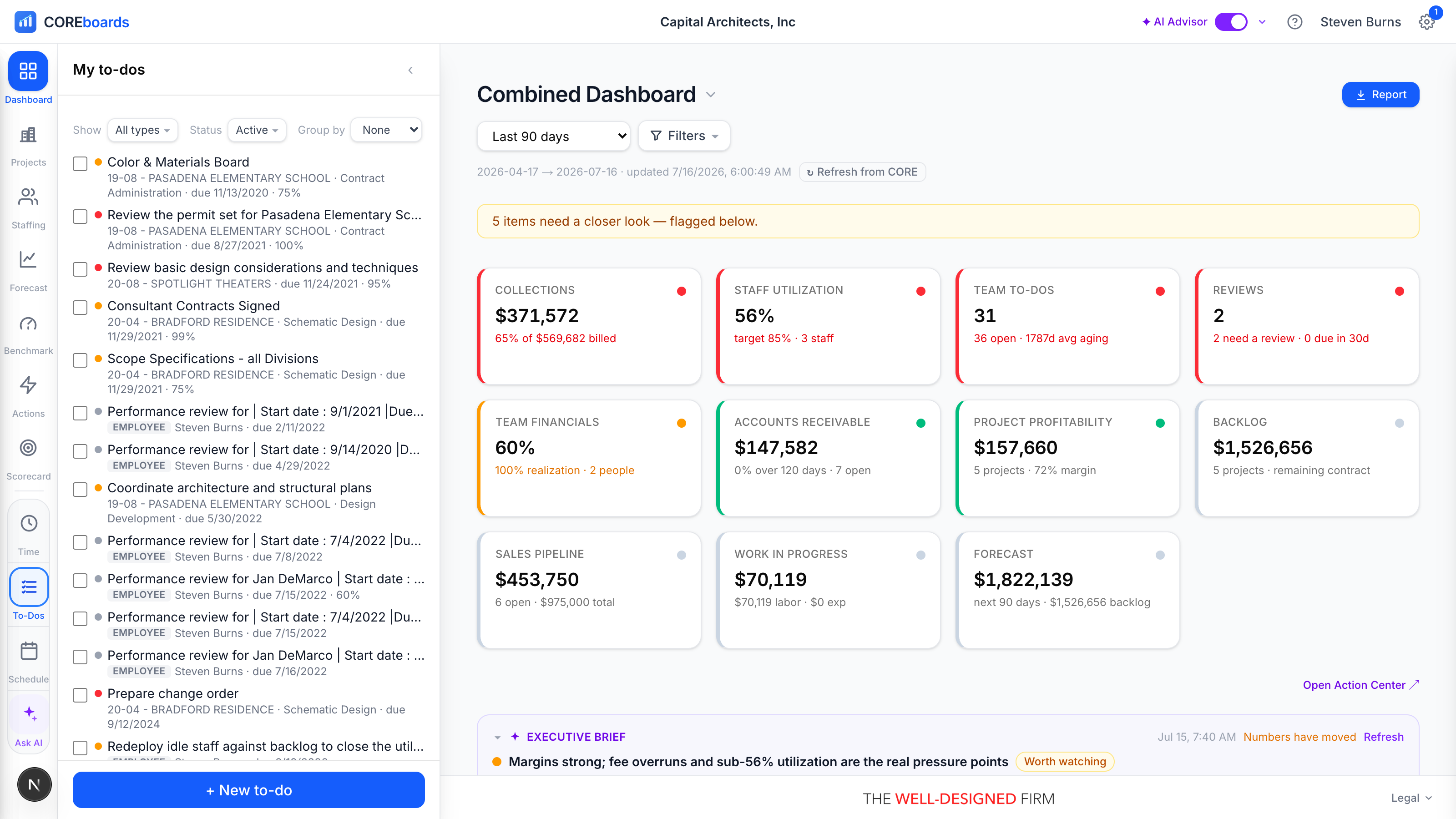
- Every to-do shows its priority dot (red High, amber Medium, gray Low), its due date (or "no due date"), and the CORE record it's linked to.
- Check the box to complete a to-do. It clears from your list and completes in CORE.
- The pane sits beside whatever you're working on, so triaging your list never costs you the screen you were on.
Add a to-do#
+ New to-do at the foot of the pane opens the full form. Only the description is required; everything else has a sensible default (assigned to you, Medium priority, no due date).
- Link to ties the to-do to the CORE record it's about: a project (pick the master or any phase, shown in CORE's structure order), a client, a vendor, an employee, and more. Or keep it Just me for a personal item.
- Set Start date and End date (the end date is what the list treats as the due date), Assigned to, Priority, Status, % Complete, and a Memo.
- When the list is grouped by entity, each record group also offers a one-line quick add: type what needs doing, press enter, done. More options reveals assignee, due date, priority, and memo without opening the full form. On a project group, the quick add can target the master or any of its phases.
Edit, reassign, delete#
Click any to-do to open it for editing: the same form as creating, in a sheet docked over the list so your place is kept.
- Reassign by changing Assigned to: the to-do moves to that person's list in CORE and in COREboards.
- Track progress with % Complete and Status without closing the item out.
- Delete removes the to-do from CORE for everyone. COREboards asks you to confirm first, because there's no undo.
Show, Status, and grouping#
Three controls at the top of the list keep a busy week readable. Your choices are remembered.
- Show is a multi-select of entity types: view only project to-dos, only client to-dos, any mix, or All types. It appears once your list spans more than one type.
- Status filters project-linked to-dos by their project's status in CORE (Draft, Active, Completed, Hold, Inactive, Canceled). Out of the box only Active projects show, so wrapped-up work doesn't clutter the list.
- Group by arranges the list: None (one flat list by due date), Priority (High, Medium, Low buckets), or Entity (grouped by type, then by record, so all of a project's to-dos sit together).
- Grouped sections fold. Collapse the noisy ones, or use Collapse all / Expand all; folded sections stay folded while you filter.
Can't find it? Email support, or use Bugs & Requests in the app's gear menu.