
Help Center / Scorecard
The Firm Scorecard
Annual targets vs. monthly actuals, kept current from CORE, frozen month by month. · Leadership · 4 min read
The spreadsheet ritual, kept current#
The Scorecard is the monthly leadership ritual many firms already run on a spreadsheet: set an annual target for each metric, record monthly actuals, and watch the year unfold. COREboards keeps it current automatically: most metrics are computed from your CORE data every month, so the check-in shrinks to the handful of numbers only your firm knows.
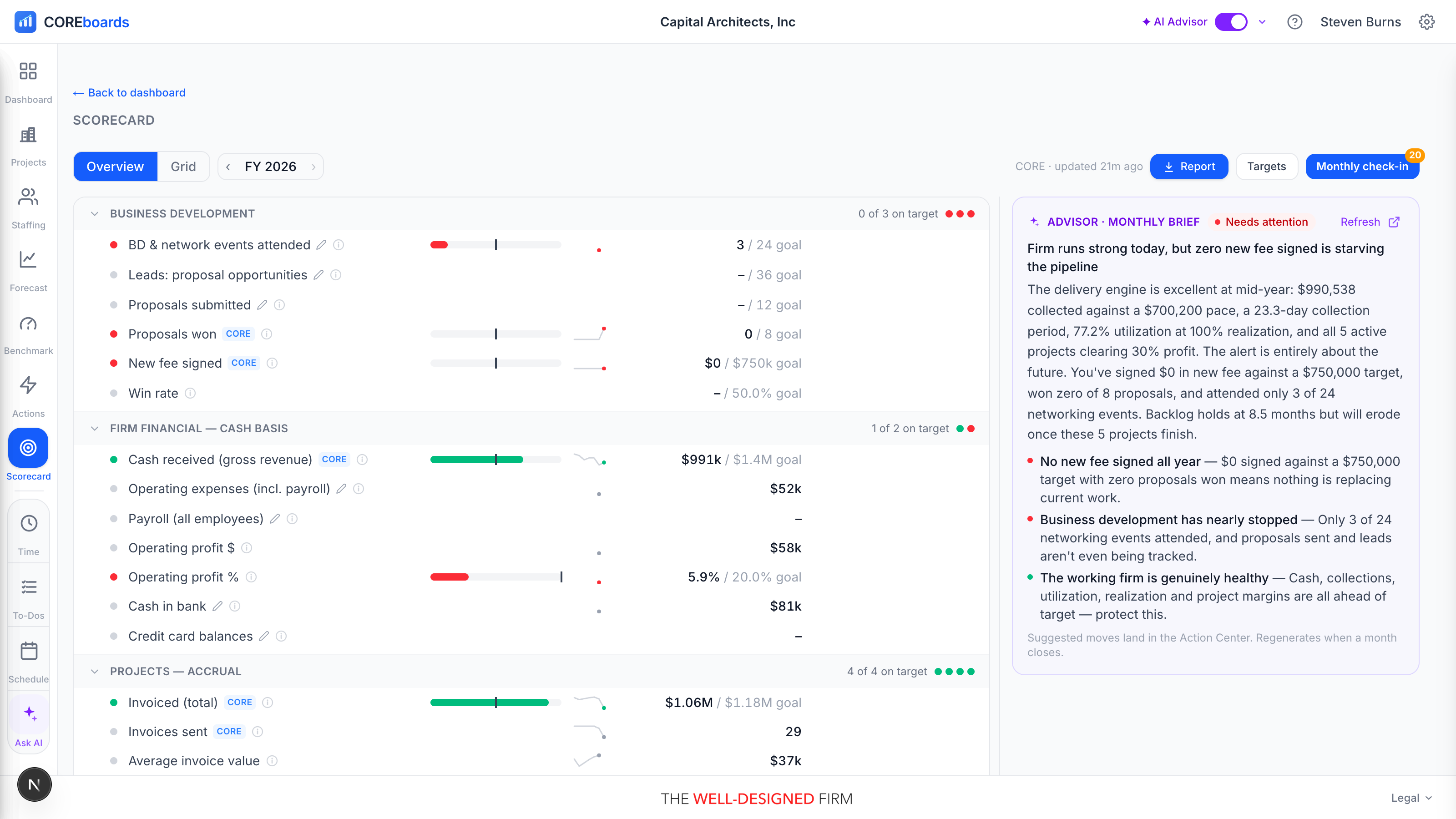
Metrics are organized in sections: Business development, Firm financial (cash basis), Projects (accrual), Project profitability, Staff, Culture & operations, and Marketing. Each metric carries a status dot (green, amber, red) against its target, and a small mark shows where its number comes from: a CORE mark for computed metrics, a pencil for values typed in the monthly check-in.
Overview and Grid#
One scorecard, two reads, switched at the top left. Step between years with the arrows beside the toggle.
- Overview: each section with a status line, and every metric as a row with a bullet bar (year-to-date against the annual goal, with a tick at where the budget says you should be by now), a 12-month sparkline, and its status dot. Firms with the AI Advisor enabled also get a written brief alongside, drawn only from closed months.
- Grid: the year table for the spreadsheet-native: a sticky metric column, then Target, per-month budget, benchmark, and YTD, followed by the months. The By control rolls Jan to Dec up into Quarters. The Grid is also the natural print and export view.
- In the Grid, the current month renders live from CORE until it is closed, and a value your firm typed over shows an adjusted mark.
Set targets#
Targets (a button for editors) opens a drawer listing every metric with two fields: the annual target and an optional benchmark (an industry or peer figure to show alongside your own).
- Start from template fills every empty target with sensible A/E-firm defaults, so a first-time setup takes minutes: accept the template, then tune the handful you feel strongly about.
- Targets are per year. Stepping to a new year starts a fresh set.
The monthly check-in#
Monthly check-in is the once-a-month ritual, and it is short by design. The drawer steps month by month and splits the metrics in two:
- From CORE: filled automatically from your invoices, timesheets, and projects. You normally leave these alone, but you can type over one if your books differ (it shows as adjusted; clear the box to go back to CORE's number).
- Your entries: the metrics only your firm knows, like cash in bank or operating expenses. The drawer counts how many are still blank so you know when you are done.
Save entries stores what you typed and leaves the month open. Close month is the commitment: it freezes every metric's value, CORE-computed ones included, into history. Closed months never drift when CORE data changes later; that frozen record is what the sparklines, the year table, and the Advisor's brief are built on. Reopen month unlocks one if you need to correct it.
See the records behind a number#
Any CORE-computed metric with records behind it is clickable: rows carrying the CORE mark open a slide-out listing the actual records that make up the number, the invoices behind Invoiced, the proposals behind Proposals won. Sort and group the list, and follow a record through to CORE itself. No more "where did that number come from?" at the leadership meeting.
Who can see it, who can edit it#
The Scorecard is a paid add-on ($20 per month for the whole firm), built on the A/E leadership scorecard framework by Douglas Teiger, FAIA (Teiger Consulting), and filled automatically from your CORE data.
- Viewing requires the add-on plus a seat: firm admins always have one, and an admin can grant Scorecard to anyone else regardless of dashboard role.
- Editing (setting targets, the monthly check-in, closing months) is for principals, CFOs, and firm admins.
- If your firm has not added it yet, eligible viewers see a preview page instead of the board: admins get an Add Scorecard button that handles checkout, everyone else is pointed to their admin.
Can't find it? Email support, or use Bugs & Requests in the app's gear menu.